
Live results
Omega in numbers Updated weekly
Same data as the public dashboard. As of Oct 23, 2026, 15:18 (PYT, UTC-3). The drops in the curve are real losses.
Growth curve
Daily growth in % since start (RoboForex CopyFX). Red segments = drops of more than 2 percentage points.
Monthly returns – every month, including the bad ones
How the Omega copy trading strategy trades
Rule-based, automated – and watched by me every day
Omega runs on a real MT5 USD account (leverage 1:500). Here is exactly what it does.
Opening range breakouts
Opening range breakout (ORB) in the Asian, European and US sessions, mainly EUR/USD intraday – fully automated.
Controlled grid
If price moves against the entry, further positions are added. The whole basket is closed via a trailing basket take profit.
No martingale
Lot sizes are never doubled to recover losses.
News filter
No new entries 30 minutes before and after high-impact news.
Daily monitoring
I check the system every day. Before strong news I prefer to close open baskets at a loss instead of hoping for a reversal.
That has a cost
Closing at a loss sometimes costs a month – May 2026 was one of them. It is meant to limit bigger damage, not to avoid losses.

Risks – stated openly
What can go wrong
Read this before you copy. If these numbers would keep you awake at night, Omega is not for you.
Drawdowns of 18–28 %
Max. drawdown so far: 17.89 % on CopyFX, highest measured value 28.20 % (MQL5, balance). Drawdowns of this size have happened and can happen again – or be larger.
Losing months
3 of 11 months were negative so far: May 2026 -16.40 % · Jul 2026 -6.55 % · Oct 2026 -1.77 % (ongoing). Expect more of them.
Why the losing months?
The losing months were not caused by the strategy itself but by my own manual decisions. When trades were still open the day before major news such as an FOMC decision, I closed them myself rather than risk an unpredictable news move – protecting the account came first. Past results are no guarantee of future results.
Grid risk
When price runs against the entry, several positions are open at the same time. A strong one-way move can push the basket deep into a loss before it is closed.
No guarantees
Past results do not guarantee future results. Your own results can differ from the signal account. Only copy money you can afford to lose.
How to copy
How to copy Omega on RoboForex CopyFX in 6 steps
Copying runs through RoboForex CopyFX. Your money stays in your own account – only you can deposit and withdraw. View Omega's CopyFX profile →
Three rules before you start
- Use a separate account only for copy trading.
- Don't touch the copied trades – no manual trades, no editing or closing positions. It breaks the risk management of the strategy.
- Never connect more than one trader per account.
Open a RoboForex broker account
Register through my partner link. Click "Register", choose "I have the Partner's code" and enter ckgq. Fill in all fields.
Verify email and identity
Confirm your email (check spam). Then upload your ID or passport and a recent proof of address (e.g. a utility or phone bill).
Open an MT5 ECN account
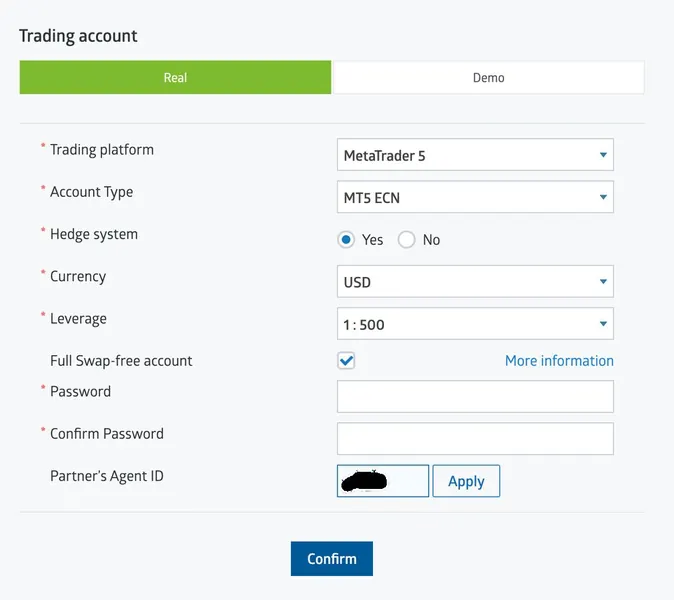
Accounts → Real account: MetaTrader 5, account type ECN, currency USD, leverage 1:500, Partner's Agent ID ckgq. Existing RoboForex clients open a new, separate account the same way.
Fund the account
Click "Deposit" on the new MT5 ECN account (bank transfer, card, crypto, …). Recommended minimum: 500 USD. Double-check you picked the right account.
Subscribe with "Proportional"
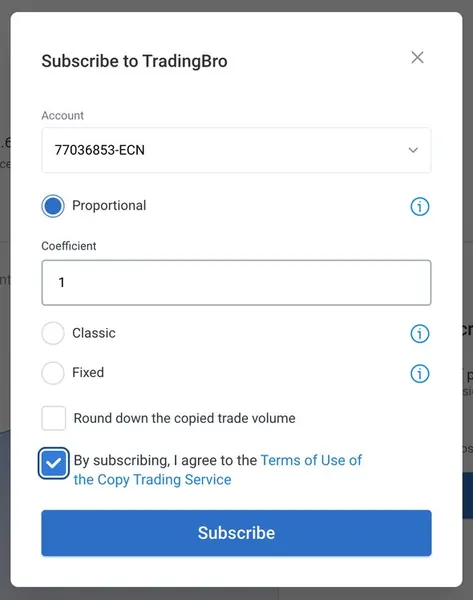
Open Omega on CopyFX, click "Subscribe", select your account and keep the copy mode on Proportional. A higher ratio multiplies the risk – a total loss is possible.
Watch in the MT5 app
Install MetaTrader 5, choose RoboForex, server ECN, and log in. You can follow every trade live – just don't change anything.
Already have a RoboForex account?
Open a separate MT5 ECN account in USD only for copying (step 3), fund it, then subscribe to Omega with "Proportional" (step 5).
Don't forget our partner code: ckgq
Fees
Fair billing via the high-watermark principle
performance fee on new profits, charged via CopyFX. Your broker's normal trading costs apply.
Performance fee only on genuine new profits
A performance fee is only charged when your account reaches a new peak – meaning real new profits were made.
If the strategy goes into a drawdown, fees stop completely until the previous peak has been fully recovered and surpassed. No fee is charged as long as you are below your previous peak.
YouTube livestream
Watch live
When I trade live, the stream shows up here automatically. Not live right now? Subscribe on YouTube to get notified.
Subscribe on YouTube → Player in privacy-enhanced mode (youtube-nocookie.com). See the Privacy Policy.
FAQ
Copy trading FAQ
What is copy trading?
Copy trading means your own trading account automatically copies the trades of another trader's account. With Omega this runs through RoboForex CopyFX: every trade on the signal account is also opened in your account, scaled to your balance with the "Proportional" mode. You keep control of your account and can stop at any time – but you also carry the full risk, including losses.
Does my computer need to run 24/7?
No. Trades are copied by RoboForex CopyFX on the server. Your PC or smartphone can be switched off.
Do I have access to my money at all times?
Yes. Your money stays in your own trading account at RoboForex. You can deposit or withdraw whenever you like.
Can I stop copying at any time?
Yes, you can unsubscribe from Omega in CopyFX at any time. You can see the subscribe and unsubscribe options yourself on Omega's CopyFX page.
Are the results guaranteed?
No. There are no guarantees in trading. The numbers on this page are past results. Losses are possible, including drawdowns larger than the ones shown.
Why do the numbers differ between CopyFX, Myfxbook and MQL5?
It is the same account, but each platform calculates differently. CopyFX includes open positions (equity), MQL5 measures the highest drawdown on the balance, and the platforms update at different times. That is why I show CopyFX as the main value and the highest measured value next to it.
How much money do I need?
The recommended minimum is 500 USD. Only use money you can afford to lose.
Seen the numbers and the risks? Then decide.
Start copying Omega, or keep following the weekly updates first – both are fine.
Risk warning: Trading financial instruments, particularly copy trading and trading leveraged forex products, carries a high level of risk to your capital and is not suitable for all investors. You may sustain losses that exceed your invested capital. Past performance is not a guarantee or a reliable indicator of future results. The figures shown are not a profit promise. Viktor Kisman and TradingBro do not provide investment advice or wealth management services. The decision to copy a strategy rests solely with you. Please make sure you fully understand the risks before you invest.
Affiliate disclosure: Links to RoboForex on this page contain my RoboForex partner code (ckgq). If you open an account through them, I may receive a commission from RoboForex. In addition, I earn from the 20 % performance fee via CopyFX when copiers reach new profits.